FineTune 1.4.1 Open Source Software – Independent Volume Adjustment Tool For MacOS Applications
Introduction
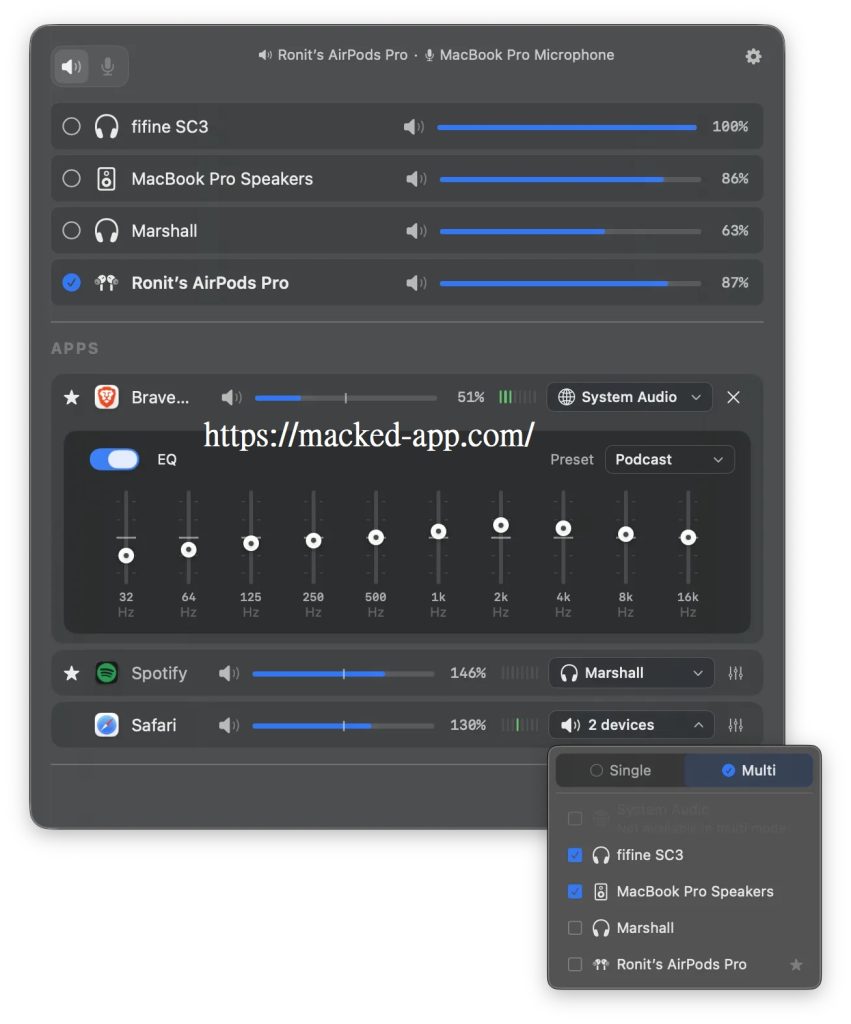
FineTune is an open-source and free macOS Sequoia (15.0 and above) menu bar audio control artifact that fills the system’s native missing independent volume adjustment by application, supports setting volume sliders and muting for each program individually, routing audio to multiple output devices at the same time, microphone input level monitoring, 10-band EQ (including 20 presets across 5 categories), amplifying volume up to 400%, applying audio to specify output devices or following system defaults, DDC volume control of external monitor speakers, automatic fallback of device priority, fixed application list with preset mute/volume/routing before power-on, lightweight resident menu bar design, and powerful URL scheme automatic script control (multi-app volume/mute/device switching/reset, etc. can be set with one click through Terminal, Shortcuts, Raycast, etc.), which perfectly solves the pain points such as listening to songs that are too loud, podcasts are too quiet, notification interference, and different apps go to different speakers. It is the ultimate localization productivity tool for users who are looking for fine audio management, refuse subscription fees, and need an alternative to SoundSource, and can be used by installing or directly downloading the latest version v1.3.2 with one click from Homebrew (GPL-3.0 license, 4.2k+ stars).
Screenshots
Features
FineTune is a free and open-source macOS menu bar audio tool designed to solve the problem of the system’s native lack of per-app volume control, it allows users to adjust the volume, mute, route output devices for each app independently, and provides advanced features such as 10-band EQ, simultaneous output from multiple devices, volume boost to 400%, automatic switching of device priority, run completely locally, support macOS 15 Sequoia and above, is SoundSource and other paid software.
- Per-app independent volume control : Provides a separate volume slider and mute switch for each running or preset app to precisely adjust the audio of music, notifications, podcasts, and more without affecting other programs.
- Simultaneous output and audio routing from multiple devices : Support routing the sound of different applications to different audio output devices, or sending them to multiple devices at the same time; You can set a device priority list to automatically fall back when the device is disconnected.
- Input device control : Real-time monitoring and adjustment of microphone volume, support independent input device management.
- 10-band professional EQ : Built-in 20 presets (divided into 5 categories) for precise audio equalization for individual applications or the entire world.
- Pinned apps and pre-configured : Supports setting the volume, device, and EQ for frequently used apps in advance, even if the app hasn’t played a sound yet.
- External display volume control : Adjust the volume of the built-in speakers of the connected display directly via the DDC protocol.
- Volume enhancement : Boost app volume up to 400% to easily amplify quiet audio sources.
- The lightweight menu bar is permanent : Doesn’t occupy the Dock, runs as a native menu bar icon, and quickly accesses all control panels at any time.
- URL Scheme automation support : Provides rich URL protocols, which can be used to set volume, mute, device routing, reset, and other operations in batches through external tools such as Terminal, Shortcuts, Raycast, and scripts (such as finetune://set-volumes?app=com.spotify.client&volume=50).
- Completely free and open source : Licensed under GPL v3, no subscription or in-app purchase, the code is published on GitHub, and can be compiled by yourself; It is recommended to install the latest version manually through Homebrew (brew install –cask finetune).
- System Requirements & Privacy : Only supports macOS 15.0 and later, and audio capture permissions are requested for the first boot, and all processing is done locally, focusing on user privacy and lightweight performance.
Related Articles