Bounce 39.0 Free Edition – Wireless Connectivity Between Mac and Android
Introduction
Bounce Connect mac crack is a local wireless collaboration tool designed specifically for connecting Mac and Android devices. It enables features such as sending and receiving text messages, syncing notifications, managing calls, sharing the clipboard, and transferring files within the same local area network (LAN), allowing mobile content to appear on macOS just like native features. It supports two-way connectivity and does not rely on cloud servers; all messages, notifications, contacts, and files are transmitted within the local network and protected by AES-256-GCM encryption to ensure data security.
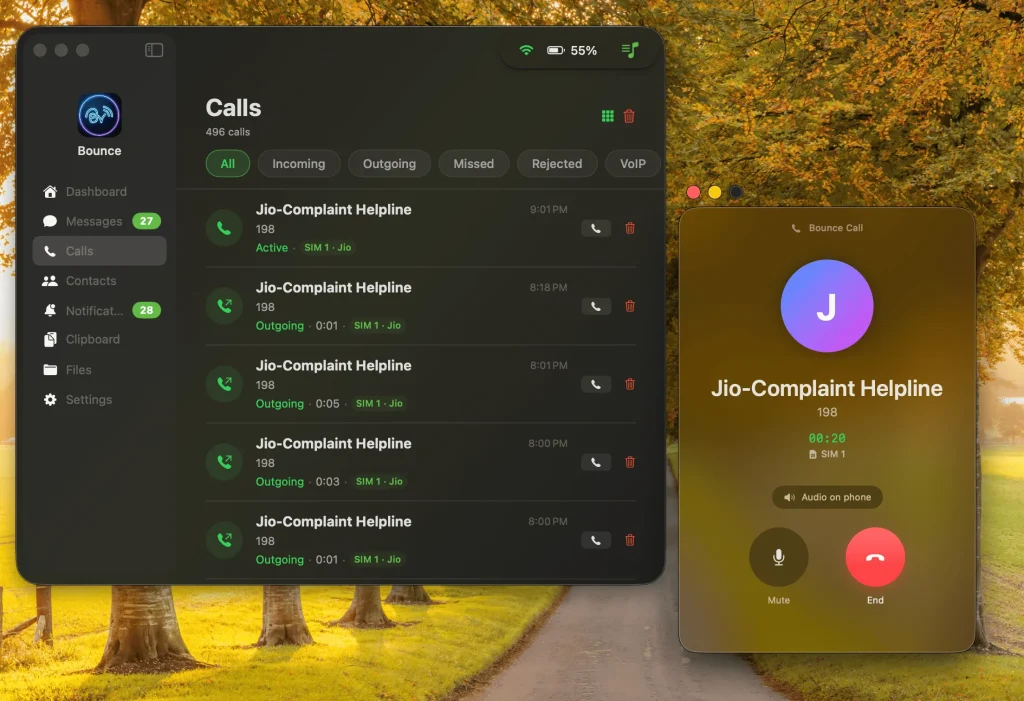
The software also offers practical features such as an iMessage-like text messaging interface, dual-SIM dialing and messaging, WhatsApp call handling, replyable desktop notifications, remote file browsing, link relay between Safari and Chrome, and clipboard synchronization for images and text—making it ideal for users who frequently switch between their computer and Android phone.
Screenshots
Features
Bounce Connect is a local wireless connection tool for Mac and Android that integrates text messages, notifications, calls, files, contacts, and the clipboard into a single cross-device workflow, allowing you to manage your phone’s content directly on your Mac with an experience that closely resembles native system integration.
- iMessage-Style Text Messaging Interface: View and reply to Android text messages on your Mac. It supports threaded conversations, timestamped history, pre-filled media, and dual-SIM selection, offering a messaging experience similar to Apple’s Messages app.
- Call Management: View incoming calls directly on your Mac desktop and answer, reject, or mute regular cellular calls. It also supports handling WhatsApp calls, making it ideal for quickly managing phone calls during meetings.
- Unified Notification Center: Mirrors Android notifications to the macOS Notification Center, allowing you to reply directly to notifications from WhatsApp, Telegram, and other apps on your Mac, as well as synchronously clear, mark as read, and block notifications from specific apps.
- Universal Clipboard Sync: Enables your Mac and Android devices to share a copy-and-paste buffer, supporting the exchange of text and image content between both platforms, reducing the need to repeatedly send links or excerpts.
- Ultra-Fast File Transfer: Transfers large files via local Wi-Fi using 512KB chunks and resume-from-breakpoint technology. Supports multi-GB videos, bulk folder downloads, and automatic cleanup of temporary files.
- Contacts Sync: Automatically imports your Android contacts, allowing you to quickly search for contacts, view names and numbers, and directly send text messages or make calls on your Mac, improving search efficiency.
- Remote File Browsing: Browse the directory structure of your Android device’s internal storage on your Mac, quickly access folders such as DCIM and Downloads, and directly retrieve photos, documents, and other files.
- Continuity Link Relay: Supports quickly pushing web links, map locations, and other content between your Mac and Android device, enabling seamless navigation via the system’s share menu.
- Privacy-First Local Connection: Does not rely on third-party cloud servers; all data is transmitted only within the local network, and a trusted connection is established using end-to-end encryption and QR code pairing.
- Power-Saving Connection Strategy: Features Smart WiFi Lock and a deep sleep mechanism to maintain the connection only on specified networks, reducing battery drain caused by background scanning and frequent wake-ups.
Recent Posts