PDF Owl 1.5.0 Cracked Version – Automatic Generation of PDF Table of Contents
Introduction
PDF Owl mac crack is a PDF reader, table of contents generator, and document organization tool for macOS. Its core capability is to use native AI, computer vision, and OCR to identify heading structures within PDF pages, automatically generating a table of contents that can be saved to a file—making it easy to quickly navigate long documents within this app or other PDF readers. It also offers detailed reading and search features, including highlighting, margin notes, free-form text annotations, bookmark shortcuts, regular expression search, search by annotated pages, search by table of contents nodes, and search by specified page ranges, as well as support for splitting, merging, reordering, copying and pasting, inserting, and deleting pages. PDF Owl emphasizes local processing and privacy protection. The AI runs on the device, and the app operates within the macOS sandbox environment without uploading any file content, making it ideal for students, teachers, researchers, and users who need to work with large PDFs such as textbooks, theses, reports, and manuals.
Screenshots
Features
PDF Owl is a PDF tool designed specifically for Mac, focusing on table of contents generation, reading annotations, precise search, and page organization for large documents. It is particularly well-suited for textbooks, theses, scanned materials, technical documents, and research papers that lack a complete bookmark structure. It analyzes the visual layout of PDFs natively, identifies page titles, and generates a table of contents outline that can be saved to a file, all while maintaining a clean interface, reading position, and sidebar layout, making navigation through long documents more stable and efficient.
- AI Table of Contents Generation: Using computer vision, OCR, and native AI models to analyze each page’s layout and heading content, it automatically constructs a PDF table of contents. The generated results can be saved to a file and used by other PDF readers.
- Hierarchical Table of Contents Recognition: Supports the generation of table of contents structures with hierarchical relationships—such as parts, chapters, and subsections—making it suitable for textbooks, academic materials, manuals, and lengthy PDFs with complex chapter structures.
- Manual Outline Editing: Users can select text on a page to add a table of contents entry, or delete, rename, and reorder existing entries to fine-tune the automatically generated outline.
- Batch Table of Contents Processing: Add multiple files to a queue to generate tables of contents in batches while away from the computer, reducing repetitive waiting times when processing large volumes of PDFs.
- Advanced Text Search: Offers a streamlined search experience similar to Safari, supporting regular expressions, whole-word matching, case sensitivity, searches on the current page, and searches within specified page ranges.
- Search by Content Range: Search only annotated pages or within selected table of contents sections to help users narrow down their search scope in large files.
- Highlighting and Text Annotations: Supports highlighting text with custom colors, adding notes to highlighted content, and creating free-form text comments with adjustable color and font size.
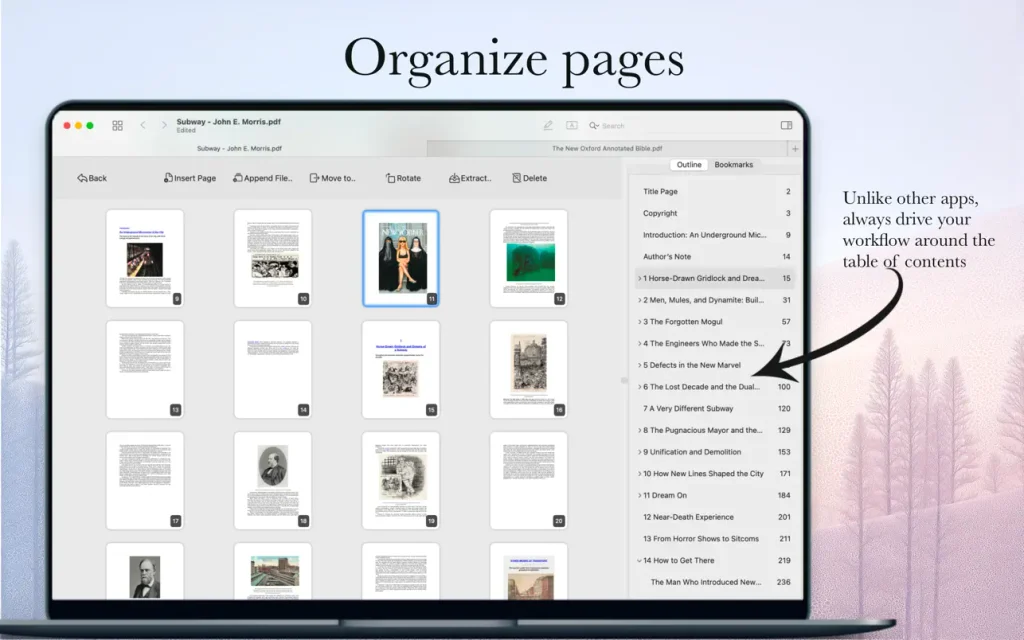
- Page Organization Tools: Supports splitting, merging, reordering, copying, pasting, inserting blank pages, and deleting pages, while keeping the table of contents and bookmarks visible in the bird’s-eye view.
- Bookmark Shortcuts: Create bookmarks and assign keyboard shortcuts to quickly navigate between important pages, chapters, and reading positions.
- Privacy-Focused Local Processing: The app runs within the macOS sandbox; AI and document analysis are performed entirely on-device, without relying on cloud uploads or collecting user data.
- Cross-Device File Compatibility: When a PDF is modified on another device or in another app via cloud storage, PDF Owl can reload the updated file while preserving your current reading position as much as possible.
- Restart State Preservation: After the app restarts, it restores your exact reading position and interface layout, making it ideal for extended reading of large documents or continuous work on research materials.
Recent Posts